shortcuts
Gnoblin reads global shortcuts from its Lua config. Use gnoblin.configure.shortcuts to run commands and gnoblin.configure.keybindings to change built-in GNOME actions. Add the examples to ~/.config/gnoblin/init.lua; changes apply when the config reloads.
Launch a command
Add this after any gnoblin.load(...) lines. It opens a terminal with Super+Enter:
gnoblin.configure {
    shortcuts = {
        my_terminal = {
            binding = "<Super>Return",
            command = {"ptyxis", "--new-window"},
        },
    },
}
Replace ptyxis with an installed terminal. Each command argument is a separate string. Spaces inside a string stay in that argument.
Shortcut names use letters, numbers, _ and -. A config can declare up to 256 shortcuts. Removing a command shortcut releases its binding; it does not stop a launched program.
Open an application launcher
Bind Fuzzel to Super+D:
gnoblin.configure {
    shortcuts = {
        launcher = {binding = "<Super>d", command = {"fuzzel"}},
    },
}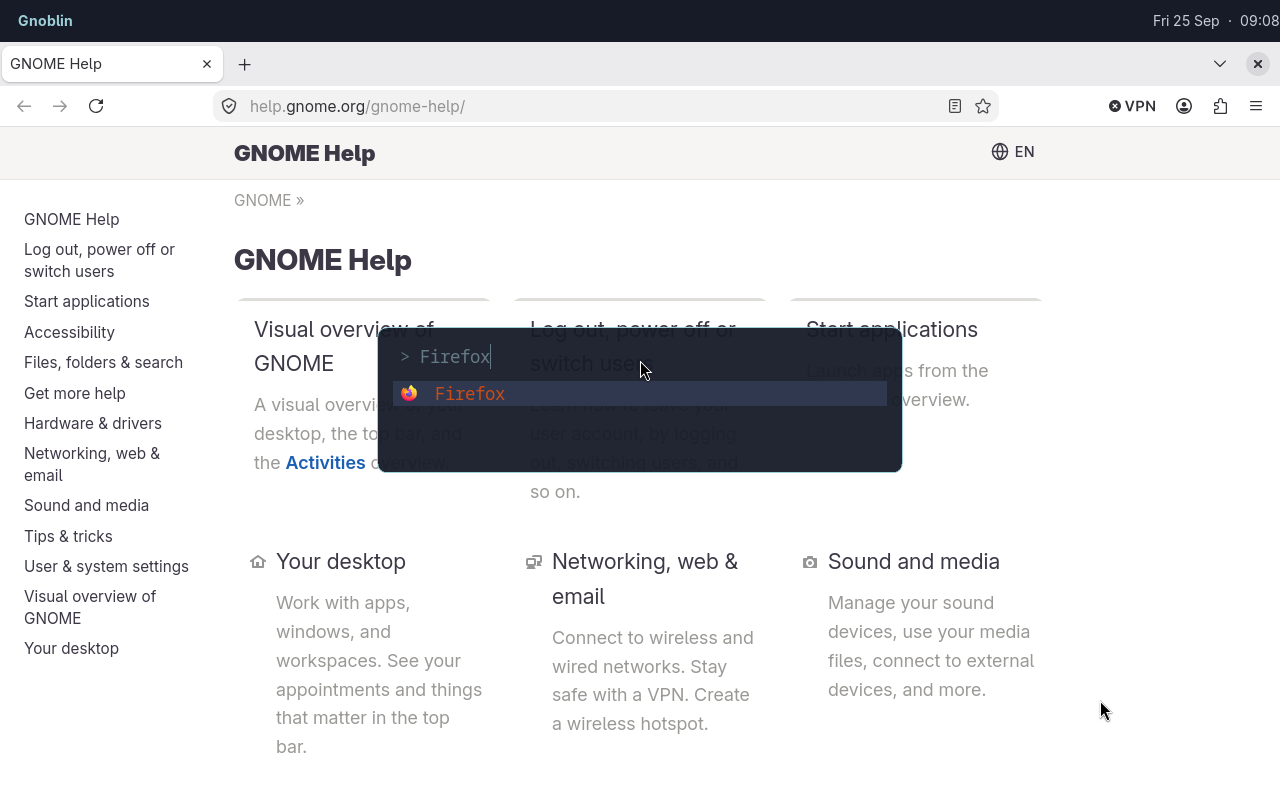
The shortcut opens Fuzzel; Firefox is the selected search result.
Remove a shortcut
Set enable = false to disable a named shortcut added by another config file:
gnoblin.configure {
    shortcuts = {
        my_terminal = {enable = false},
    },
}
The config is rebuilt on every reload. Disabling a command shortcut releases its binding. Shortcuts registered by other programs are unaffected.
Put the removal after the file that adds the shortcut. See load order.
Key names
| Binding | Keys |
|---|---|
"<Super>Return" | Super + Enter |
"<Super><Shift>q" | Super + Shift + Q |
"<Alt>F8" | Alt + F8 |
"Super" | Super press and release, without another key |
Super is usually the Windows-logo key. Put modifiers in angle brackets and the main key after them. This is GTK accelerator syntax.
Run gnoblinctl shortcut capture in a Gnoblin terminal and press a key combination. It prints the GTK accelerator for binding; bare Super prints Gnoblin’s special Super binding. Escape cancels. The command grabs the keyboard while it waits, consumes the captured combination, and times out after 30 seconds by default. Use --timeout SECONDS for 1–60 seconds.
Held keys do not repeatedly launch commands. Command shortcuts are inactive on the lock and login screens.
Change a built-in action
gnoblin.configure {
    keybindings = {
        wm = {close = {"<Super>q"}},
    },
}
Built-in actions accept a list of accelerator strings. Use an empty list to disable one. The group must be shell, wm, mutter, or wayland; each group maps to a GNOME GSettings keybinding schema. The action names and defaults depend on your installed GNOME version; Gnoblin does not define a fixed list for every version.
Find the schema and action names on your system with gsettings list-schemas and gsettings list-keys SCHEMA. Run gsettings describe SCHEMA KEY to read an action's description. GSettings prints show-screenshot-ui; the Lua key is shell.show_screenshot_ui. The keybinding reference lists all four groups and gives examples.
GNOME Settings edits do not change Gnoblin's active bindings. Removing an override restores the default on reload.
Media keys
Media keys use command shortcuts. The starter config includes editable volume, microphone mute, brightness, and playback controls.
Run gnoblinctl config path to see the config file used by your session. Run gnoblinctl config default to print the packaged starter config. For example, a volume key can run wpctl directly:
gnoblin.configure {
    shortcuts = {
        ["volume-up"] = {
            binding = "XF86AudioRaiseVolume",
            command = {"wpctl", "set-volume", "@DEFAULT_AUDIO_SINK@", "5%+"},
        },
    },
}
Edit or remove these entries in your Lua config to change the media-key behavior. The commands they call must be installed.
Avoid conflicts
To override an imported shortcut, use the same map key. Only supplied fields change. Different names must use different bindings. See the override example.
A built-in action may already use the key. Change or disable it through gnoblin.configure.keybindings before assigning the same key to a command. Gnoblin rejects duplicate bindings in the config and keeps the previous working registrations if a reload contains an invalid or conflicting shortcut.
Commands and shell syntax
Commands run directly. $HOME, ~, pipes and redirection are not expanded. Use an absolute path, a program on PATH, or explicitly run a shell:
gnoblin.configure {
    shortcuts = {
        ["log-time"] = {
            binding = "<Super><Shift>t",
            command = {"sh", "-c", "date >> \"$HOME/shortcut.log\""},
        },
    },
}
This appends the current time to ~/shortcut.log when you press Super+Shift+T.
Popups that capture typing
A shortcut can set capture_input = true to buffer typing while a popup starts. The popup must implement the input handoff protocol. Do not enable it for ordinary terminal or application launch commands.
See also restore-or-minimise bindings.